podbag 0.1.0: containers with no daemon, stored file by file
by The podbag team · 
 @SteelCrabon in AnnouncementsPermalink
Today we release podbag 0.1.0, the first version of podbag.
podbag is a container engine. It runs your Docker and OCI images from one static binary. It has no daemon. It stores images file by file, not layer by layer.
Short on time? Watch the 30-second intro.
What podbag is
- No daemon. When no container runs, nothing runs.
- One static binary. About 4 MB on Linux.
- Files, not layers. A file that many images share is stored once and cached once.
- Fast. A container starts in about 4 ms on Linux.
- Works with Docker tools. The
dockerCLI, Compose and buildx. - With or without root. The same program works both ways.
- Linux, macOS and Windows. Windows support is experimental.
No daemon
Docker is a client and two daemons. dockerd and containerd run all the time, with or without containers. With no containers, they still hold 203 MiB.
podbag is one program:
- The
podbagcommand sets up each container itself, and then returns. - One small keeper per user (about 2 MiB) watches the running containers. It writes their logs, and answers
stop,killandwait. - The keeper starts with the first container. It stops 10 seconds after the last one.
- With no container, nothing runs.
Files, not layers
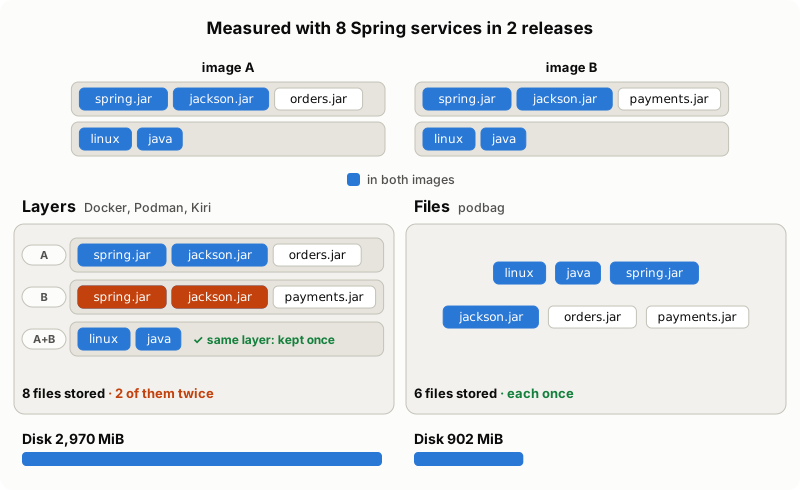
Other engines store an image as layers. A layer is kept once only when the whole layer is the same. When one file in it changes, the whole layer is stored again.
podbag splits each layer into files, and keeps each file once. An image is a list of paths to these files. When two containers read the same file, they read the same inode, so the kernel caches it once.
We measured 8 Spring services in 2 releases:
Data table
| podbag | Docker | podbag saves | |
|---|---|---|---|
| Disk for both releases | 902 MiB | 2,970 MiB | 70% |
| Page cache to start their 16 services | 324 MiB | 982 MiB | 67% |
Downloads stay the same size. Registries serve layers, and podbag downloads them whole before it splits them into files.
Start time and memory
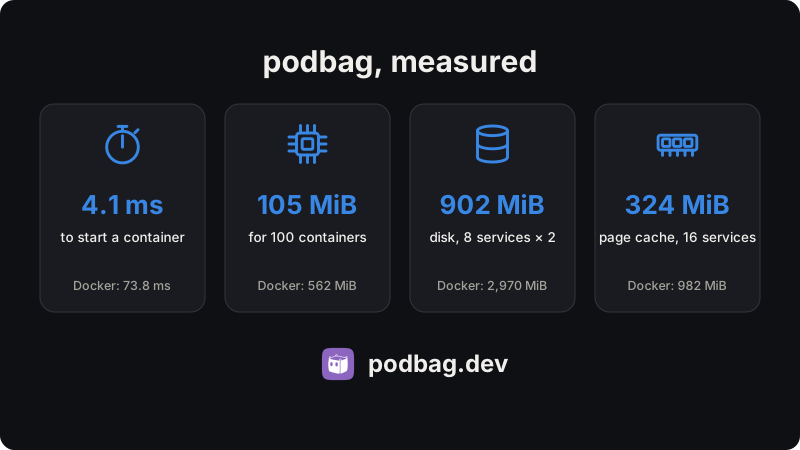
We ran every tool on the same Linux VM: 4 CPUs, 3.8 GiB, arm64. The versions: podbag 0.1.0, Podman 5.7.0, Docker 29.1.3 and Kiri 0.2.1. The numbers are medians. Lower is better.
Data table
| podbag (rootless) | podbag (root) | Kiri | Podman | Docker | |
|---|---|---|---|---|---|
| Start a container | 4.1 ms | 4.4 ms | 9.1 ms | 46.4 ms | 73.8 ms |
| Memory for 100 containers | 117 MiB | 105 MiB | 109 MiB | 203 MiB | 562 MiB |
| Processes with no containers | 0 | 0 | 1 (5.9 MiB) | 1 (0.6 MiB) | 4 (203 MiB) |
- The first start, when no keeper runs yet, takes 12.8–16.0 ms.
- Kiri is close on memory. podbag is ahead when no container runs, because then nothing of it runs.
- All numbers, and how we measured them: benchmarks and the Spring microservices benchmark.
- The same comparison as a video: perf.mp4.
Works with your Docker tools
podbag system service serves the Docker Engine API on a socket. The docker CLI, Compose and buildx talk to it.
podbag system service &
export DOCKER_HOST=unix://$XDG_RUNTIME_DIR/podbag/docker.sock
docker compose up -d- It is not a daemon. Containers do not depend on it.
- It stops after 60 seconds without a client.
- With systemd, it can start on the first connection.
With or without root
- The same program works both ways.
- As root, podbag mounts images with composefs.
- Without root, it makes trees of hard links, and
pastaconnects the containers to the network. podbag checklists what your system still needs, and how to add it.
Linux, macOS and Windows
- Linux: x86_64 and arm64. Linux 5.12 or later, with cgroup v2.
- macOS (Apple silicon): podbag runs a small Linux VM of its own. The first command starts it in about half a second. The VM powers off 60 seconds after the last container. Six minutes after the last container, podbag held 1.7 MiB of the Mac's memory.
- Windows (x86_64 and arm64): experimental. podbag runs its Linux engine in a WSL 2 distribution of its own. It is built and tested in CI, but not yet tried on a Windows machine.
Install
On Linux and macOS:
curl -fsSL https://podbag.dev/install.sh | shThe script downloads the file for your system, checks its SHA-256 sum, and installs it in /usr/local/bin.
You can also get a file from the release page. Check it with SHA256SUMS.
| System | File |
|---|---|
| Linux, x86_64 | podbag-x86_64-linux |
| Linux, arm64 | podbag-aarch64-linux |
| macOS, Apple silicon | podbag-aarch64-macos |
| Windows, x86_64 (experimental) | podbag-x86_64-windows.exe |
| Windows, arm64 (experimental) | podbag-aarch64-windows.exe |
Then run your first container:
podbag run --rm alpine echo helloThe limits of 0.1.0
This is a first release. Some things are not there yet:
- Builds: Dockerfiles build only through buildx (
docker buildx build). There is no classic builder. - Registries: podbag pulls public images. There are no logins, no private pulls and no push.
- Docker commands: no
commit,export,diff,stats,top,pause,renameorupdate. - Swarm: no swarm mode, and no plugins.
- Kubernetes: there is no CRI, so a Kubernetes node cannot use podbag as its runtime.
- Windows: experimental. The
dockerCLI on Windows cannot reach podbag yet. - Mac wake-up: the first command after the VM powered off takes about 0.6 s.
What comes next
Work on these is in open pull requests. It is not finished, and we give no dates:
- registry logins, private pulls, push and search;
- Dockerfile builds, and
commit,exportanddiff; - a Kubernetes runtime, so a node can run its pods with podbag;
- swarm mode on one node;
stats,top,pause,unpause,renameandupdate;- a terminal UI and a desktop app.
Try it and tell us
- Read the usage guide for all commands.
- Report bugs and ideas in GitHub issues. Reports from Windows machines help most.
- podbag is open source, under the Apache License 2.0.